
Cooling Guides
Breezair Controller Guide: MagIQTouch, CPMD, SpectroLink and Wireless Options for Breezair, Braemar and Coolair
Sep
Looking for a replacement Breezair controller? Breezair, Braemar and Coolair coolers are all made by Seeley International and share the same family of wall controllers, looms and control boxes. The catch is that there are several controller generations, and they are not all interchangeable. This guide explains how to identify the controller you have, which replacement suits your cooler, and when the real fault is the loom or the control box on the roof.
Which Breezair controller do I have?
Most Breezair, Braemar and Coolair coolers installed in the last 20 years use one of three controller types:
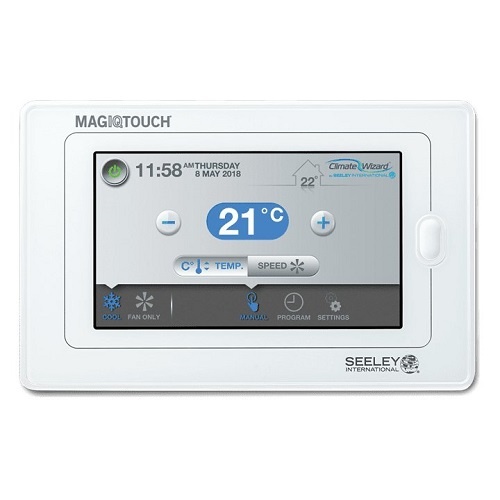
- MagIQTouch: a full-colour touchscreen. It lights up when touched, turns blue for cooling and red for heating, and has 7-day programming, zoning and a child lock. It runs on a 6-pin loom.
- CPMD / Icon: a keypad-style wall controller with buttons for fan speed, pump and auto mode. It runs on a 4-pin loom and is found on EX, EZ, EXH, EZH, EXD and EZD Breezair models and many Braemar and Coolair models.
- SpectroLink: an older Braemar controller designed for Braemar ducted gas heaters, which can also run Breezair and Coolair evaporative systems in a combined heating and cooling setup.
The easiest way to check is to take your controller off its mounting plate and look at the label on the back, or count the pins on the plug. Six pins means MagIQTouch; four pins means CPMD, Icon or SpectroLink.
Breezair MagIQTouch controller
The genuine MagIQTouch touch screen controller (094298RP) is the current Seeley controller. It works with evaporative cooling, Braemar ducted gas heating, add-on cooling and CW3 dual systems, so one controller can run heating and cooling across the whole house.
Add-ons for MagIQTouch:
- MagIQTouch WiFi kit (118352): lets you control your cooler from your phone. It includes the WiFi module, power supply and a 20 m loom, and needs a MagIQTouch controller already installed.
- MagIQTouch RF wireless kit (118260): a battery-operated wireless version, ideal for renovations or where running a new cable is difficult.
- 6-pin MagIQTouch loom, 20 m (094298): the cable between the controller and the cooler.
Breezair CPMD and Icon wall controllers
If your cooler has a push-button controller, the genuine Breezair CPMD controller (110196) is the direct replacement. It suits these models:
- EX series: EX125, EX145, EX165, EX190, EX210
- EZ series: EZ130, EZ160, EZ195, EZ215
- EXH series: EXH130, EXH150, EXH170, EXH190, EXH210
- EZH series: EZH175, EZH215
- EXD series: EXD150, EXD170
- EZD series: EZD155, EZD175
It plugs into the existing 4-pin CPMD/Icon loom (834245). Note that the 4-pin loom will not suit a MagIQTouch controller, and the 6-pin MagIQTouch loom will not suit a CPMD or Icon controller.
Braemar SpectroLink controller
The genuine Braemar SpectroLink multizone controller (077390) suits Braemar ducted gas heaters and combined systems that also run a Breezair or Coolair evaporative cooler. It offers zoned temperature control, energy-saving modes and built-in diagnostics. Gas heater installations use the 4-pin SpectroLink loom (832777).
Is there a Breezair remote control?
Many people search for a “Breezair remote control”, but most Breezair controllers are wired wall controllers rather than handheld remotes. The CPMD controller is sometimes sold as a “remote controller”, but it is wired to the cooler through the 4-pin loom. If you want true wireless control, your options are:
- the MagIQTouch RF kit, a battery-powered wireless wall controller, or
- the MagIQTouch WiFi kit, which lets you run the cooler from a phone app.
Both need a MagIQTouch-compatible cooler. Older CPMD and Icon coolers usually need a MagIQTouch-compatible control box before they can be upgraded.
Controller, loom or control box: find the real fault
A blank or unresponsive controller isn’t always a faulty controller. Before you buy, check:
- Power: make sure the cooler’s isolation switch on the roof and the circuit breaker are on.
- Loom: a damaged, chewed or loose cable causes a blank screen or communication errors. Looms often fail at the plug or in the roof space.
- Control box: if the controller powers up but the fan, pump or drain valve don’t respond, the fault is often in the control box on the cooler.
Replacement control boxes for Breezair, Braemar and Coolair include:
- MagIQ control box with external sensor (116815): Breezair EXQ, EZQ and EXS
- MagIQ control box with external sensor (116891): Braemar LCQ, BMQ, LCS and Coolair CPQ
- CPMD control box (107769): Breezair EX, EZ and Braemar RPC
- CPMD control box (107738): Braemar LCB, LPA, LCA, LPM, LPR, BM and Coolair CPL, CPS, CVP
- Icon DD control box (109930): Breezair EXH and EZH direct-drive models
- Dual-port ICPMD control box (117423): Braemar LPQI and LCQI
See all Breezair, Braemar and Coolair control boxes. For a step-by-step fault check, read our evaporative cooler wall controller replacement guide.
How to find the right replacement
- Find your cooler model on the data plate on the cooler (for example EXQ170, EXH190 or LCQ350).
- Check the label on the back of your current controller and count the plug pins.
- Match the controller type to the list above, or browse all Breezair, Braemar and Coolair wall controllers.
- If the loom is damaged or you’re moving the controller, order a new 20 m loom with the correct pin count.
Electrical work on the cooler and control box should be done by a qualified technician.
Frequently asked questions
Can I replace a CPMD controller with a MagIQTouch?
Not by simply swapping the wall controller. MagIQTouch uses a 6-pin loom and needs a MagIQTouch-compatible control box. Many EX and EZ coolers can be upgraded, but the control box and loom usually need to change as well. Contact us with your cooler model and we’ll confirm what’s needed.
Are Breezair, Braemar and Coolair controllers the same?
They are all Seeley International products and share controller families, so a MagIQTouch or CPMD controller often suits all three brands. Always check your cooler model against the product’s fitment list.
How do I reset my Breezair controller?
Turn the cooler off at the isolation switch or circuit breaker for about a minute, then turn it back on. If the controller still shows a fault code or stays blank, check the loom and control box as described above.
Why is my Breezair controller screen blank?
The most common causes are no power to the cooler, a damaged loom or a failed control box. A faulty controller is less common than people expect, so check the loom first.
Not sure which controller you need? Browse all Breezair, Braemar and Coolair spare parts, or contact HotnCool with your cooler model and a photo of your controller and we’ll check compatibility for you.
More evaporative cooler guides
- Breezair spare parts guide: Breezair, Braemar and Coolair cooler parts explained
- Evaporative cooler wall controller replacement guide
- Bonaire Navigator controller guide
- Brivis controller guide: NC-6 Networker and control modules
- Evaporative cooler service checklist: pre-summer maintenance
