
Cooling Guides
Evaporative Cooler Service Checklist: Pre-Summer Maintenance Guide
Sep
An evaporative cooler service before summer is the easiest way to make sure your cooler starts cleanly, cools properly and doesn’t let you down on the first hot day. After months of sitting idle, pads dry out, dust and leaves collect in the tank, and valves can stick. This checklist walks you through what to check, what to clean and which parts are worth replacing, whether you do the work yourself or book a technician.
When to do an evaporative cooler service
The best time is in spring, a few weeks before you expect to need cooling. That gives you time to order any parts before the summer rush. If your cooler runs a lot, a second check in mid-summer helps too. Regular evaporative cooler maintenance keeps water flowing evenly over the pads, which is what gives you cool air.
Evaporative cooler service checklist
Work through these steps in order. Most coolers from Bonaire, Breezair, Brivis and CoolBreeze follow the same basic layout, although panels and fittings differ between models.
- Isolate the power. Switch the cooler off at the controller and at the isolation switch before opening any panels.
- Check the roof and cabinet. Look for loose panels, damaged seals, cracked plastic and anything blocking the air inlets.
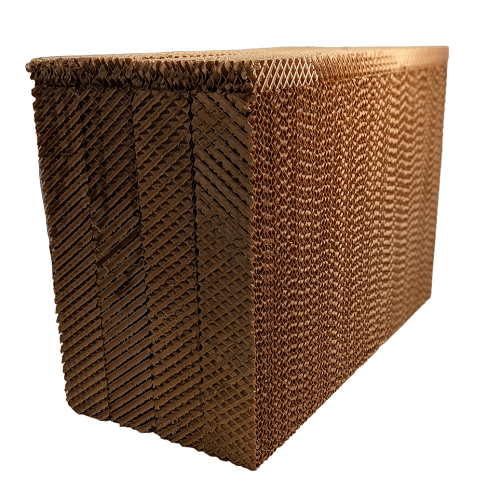
- Remove the pad frames and inspect the pads. Pads should be firm and evenly coloured. Heavy white scale, crumbling edges, sagging or a musty smell mean it’s time for new pads.
- Clean the tank. Scoop out leaves and sludge, then flush the tank with clean water. Avoid harsh chemicals that can damage plastic or pads.
- Check the pump. Clean the pump inlet screen and make sure the impeller spins freely. A pump that hums but doesn’t move water, or trips power, may need replacing.
- Check the water distribution. Clear any blocked holes or channels so water spreads evenly across the top of every pad.
- Check the float valve and solenoid. The tank should fill to the correct level and stop. If it overflows or doesn’t fill, look at the float valve and the inlet solenoid valve.
- Check the drain or dump valve. The tank should hold water while the cooler runs and empty when it’s switched off.
- Check the fan and motor. Spin the fan by hand. It should turn smoothly without wobble, rubbing or grinding. Check the fan collet and belt (on belt-drive models).
- Reassemble and test. Restore power, run the cooler on pump-only or pre-wet for a few minutes, then on cooling. Check for leaks, even pad wetting and normal noise.
Cleaning evaporative cooler pads
Cleaning evaporative cooler pads can extend their life if they are only lightly dirty. Gently hose the pads from the inside out at low pressure, let them drain, and check them again. Don’t scrub or use a high-pressure washer, which can break the pad material.
Replace the pads if they are heavily scaled, damaged or smell even after cleaning. Pads are sized to the cooler model, so check your model plate first. Browse Bonaire & Celair filter pads, Breezair, Braemar & Coolair filter pads or Brivis filter pads, and see our pad replacement guide for sizing help.
Parts worth checking or replacing
- Pumps – a weak or noisy pump leaves pads dry. For Bonaire and Celair coolers, popular replacements include the Fasco JRM38 pump and JRM28 pump. See all Bonaire & Celair cooler pumps and our pump guide.
- Float valves – a worn float valve can cause overflowing or low water, such as the Breezair vertical float valve or the Brivis Philmac float valve.
- Solenoid valves – if the tank won’t fill, the inlet solenoid may have failed, for example the Breezair 24VAC solenoid valve. Our float valve and solenoid guide explains both.
- Drain valves – a leaking or stuck valve wastes water or leaves stagnant water, such as the Bonaire Aquamiser drain valve. See the drain valve guide.
Quick fault finder
- Cooler blows warm air: pads dry or partly wet – check the pump, water level and distribution.
- Water overflowing: float valve set too high or worn.
- Tank empty while running: solenoid not opening, water supply off, or drain valve not sealing.
- Musty smell: stagnant water or old pads – clean the tank and consider new pads.
- Noise or vibration: fan out of balance, worn collet or failing motor bearings.
Safety first
- Always switch the cooler off and isolate the power before opening it.
- Roof work is dangerous. Use proper fall protection, or have a qualified technician do the service.
- Any work on mains wiring, motors or control boxes must be done by a licensed electrician.
Frequently asked questions
How often should an evaporative cooler be serviced?
At least once a year, ideally in spring before summer. Coolers that run heavily or are in dusty or hard-water areas benefit from a mid-season check too.
Can I service an evaporative cooler myself?
Many owners do the basic cleaning and pad checks themselves. Leave roof access you’re not comfortable with, and all electrical work, to a qualified technician or licensed electrician.
How long do evaporative cooler pads last?
It depends on water quality, how much the cooler runs and how well it’s maintained. Replace pads when they are heavily scaled, damaged or smell even after cleaning.
What should I do with the cooler over winter?
Drain the tank, switch off the water supply to the cooler and fit a winter cover if your model uses one, so it’s ready for next season’s evaporative cooler service.
Not sure which parts your cooler needs? Contact HotnCool with your cooler’s model number and we’ll help you find the right parts.
More evaporative cooler guides
