
Cooling Guides
MagIQtouch Not Working? 01 Not Detected, Blank Screen and Reset Explained
Nov
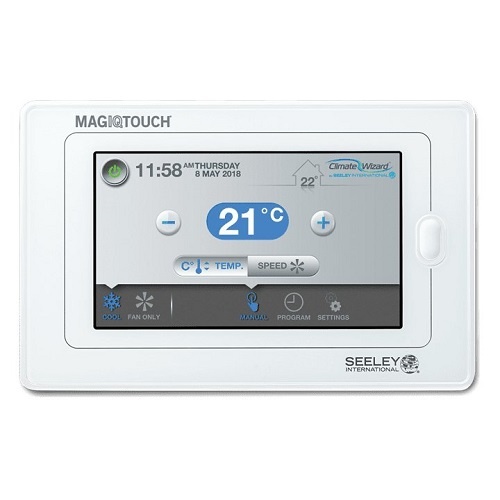
The MagIQtouch is the touch screen wall controller used on Breezair, Braemar and Coolair evaporative coolers (and some Seeley heaters). When it stops working, the cooler usually stops too, so it is worth knowing the simple checks before you call a technician or buy a new controller. This guide covers the most common MagIQtouch not working problems: 01 Not Detected, a blank or frozen screen, a wireless controller that stops responding after new batteries, and how a system reset works.
Safety first: anything inside the cooler’s control box or on the roof is a job for a licensed electrician or a qualified evaporative cooler technician. The checks marked “you can do” below need no tools and no access to wiring.
Start here: turn the power off for 2 minutes (you can do)
Unstable or interrupted power can lock up the electronics in the controller or the cooler’s control box. Seeley’s own first step is a simple power cycle:
- Switch the cooler off at its isolator or circuit breaker.
- Wait at least 2 minutes.
- Turn the power back on and give the MagIQtouch time to start up.
This clears a surprising number of faults, including many “01 Not Detected” messages after a storm or power cut.
MagIQtouch shows “01 Not Detected”
“01 Not Detected” means the wall controller cannot talk to the cooler’s control box. In the roof you may also see no flashing green light on the control box. Work through these in order:
- Power cycle as above (2 minutes off).
- Reconnect the controller cable (you can do). Lift the MagIQtouch off its wall bracket, unplug the cable from the back, wait at least 1 minute, plug it back in firmly and let the controller reboot.
- Check the controller cable (technician). The 6-pin cable runs from the wall controller to the cooler. A crushed, chewed or water-damaged cable, or a loose plug at the cooler end, causes exactly this fault. Replacement: MagIQtouch 6-pin loom, 20 m (PN 094694).
- External air sensor (technician). If your controller shows an outdoor temperature, an external sensor is fitted. On some coolers (mostly Breezair EXS models made before 2024) a faulty sensor can stop the control box communicating. Switching the sensor off in the cooler settings does not fix this; a technician needs to unplug it at the control box to test it.
- Control box (technician). If the cable tests fine and the controller works on another cooler, the control box electronics are the likely cause. See Breezair MagIQtouch control box (PN 116815) or Braemar and Coolair MagIQ control box (PN 116891).
Blank, black or frozen screen
- Check the power (you can do). A wired MagIQtouch is powered through its cable from the cooler, so a tripped breaker or an isolator switched off on the roof leaves the screen blank.
- Reconnect the cable (you can do). Unplug the cable from the back of the controller for a minute and plug it back in.
- Screen frozen on one page. A power cycle usually clears it. If it keeps freezing, the controller may be faulty.
- Still blank with power at the cooler. Either the cable or the controller has failed. A technician can test the cable; if the cable is good, the controller needs replacing: MagIQtouch touch screen controller (PN 094298RP).
Wireless (RF) MagIQtouch stopped working after new batteries
If the screen works but the cooler ignores it after a battery change, the controller has usually gone into diagnostic mode because the side (HOME) button was pressed while the batteries went in. The fix takes a minute:
- Take all four AA batteries out.
- Hold the controller upright in your hand, without touching the HOME button.
- Put the batteries back in one at a time.
The controller should return to normal on its own and keep its pairing. Lithium or good alkaline AA batteries last longest; avoid cheap carbon-zinc and rechargeable cells. Replace them about once a year. If batteries go flat in under three months, check that the controller is not in direct sun, near a heater or duct outlet, or a long way from the cooler through thick or metal walls. For a wireless setup you need the MagIQtouch RF kit (PN 118260).
How a MagIQtouch system reset works
A system reset clears the controller’s record of which coolers, heaters and zones are connected. It is used when the screen reports components not found, or lists equipment you do not have. It does not clear cooler fault codes.
The reset is done with a pin in the small reset hole on the back of the controller, followed by an installer access code, and then the installation wizard must be run again. Seeley says this should only be done by a qualified installer or technician, because a wrong reset on a multi-zone or multi-controller system can leave it unable to communicate. If you are not sure, power cycle first and call a technician rather than resetting.
Fault code on the screen?
If the MagIQtouch shows SERVICE and a number (for example 02 or 04), the controller is working and the cooler itself has found a fault. See our Breezair, Braemar and Coolair fault codes guide for what each code means and which part to check.
WiFi will not connect
App control needs the MagIQtouch WiFi kit (PN 118352) fitted to the controller. If the app cannot find the controller, check your home WiFi works at the wall controller, restart your router, then follow the pairing steps in the app again.
Which MagIQtouch part do I need?
| Problem | Part | Part number |
|---|---|---|
| Controller screen dead or faulty | MagIQtouch touch screen controller | 094298RP |
| Damaged cable between controller and cooler | MagIQtouch 6-pin loom, 20 m | 094694 |
| Want a wireless controller | MagIQtouch RF kit | 118260 |
| Want app control | MagIQtouch WiFi kit | 118352 |
| Breezair control box failed | Breezair MagIQtouch control box | 116815 |
| Braemar or Coolair control box failed | Braemar and Coolair MagIQ control box | 116891 |
For older CPMD wall controls, remotes and SpectroLink, see our Breezair controller guide, or browse all Breezair, Braemar and Coolair parts.
MagIQtouch FAQs
Why does my MagIQtouch say 01 Not Detected?
The controller has lost contact with the cooler’s control box. Turn the power off for 2 minutes, then unplug and refit the cable on the back of the controller. If it comes back, a technician should check the cable, the external air sensor (if fitted) and the control box.
How do I reset my MagIQtouch controller?
Start with a power cycle: power off at the breaker for 2 minutes. A full system reset uses the reset hole on the back of the controller and an installer code, and the installation wizard must be run again afterwards, so it is best left to a technician.
Can I replace a MagIQtouch controller myself?
The wall controller plugs into its cable on the wall bracket, so swapping a like-for-like controller is simple. After fitting, the controller may need setting up through its installation wizard. Anything in the roof or control box should be done by a licensed technician.
Do you ship MagIQtouch parts Australia-wide?
Yes. HotnCool sends genuine MagIQtouch parts to Adelaide, Melbourne, Sydney, Brisbane, Perth, Canberra, Hobart, Darwin and regional areas, and usually dispatches within 24 hours.
